
Deprecated: Optional parameter $shortcode declared before required parameter $args is implicitly treated as a required parameter in /home/ashishka/public_html/wp-content/plugins/wp-cirrus/wp-cirrus.php on line 331

Warning: Cannot modify header information - headers already sent by (output started at /home/ashishka/public_html/wp-content/plugins/wp-cirrus/wp-cirrus.php:331) in /home/ashishka/public_html/wp-content/plugins/all-in-one-seo-pack/app/Common/Meta/Robots.php on line 89

Warning: Cannot modify header information - headers already sent by (output started at /home/ashishka/public_html/wp-content/plugins/wp-cirrus/wp-cirrus.php:331) in /home/ashishka/public_html/wp-includes/feed-rss2.php on line 8
VPS hosting | Web Hosting Stuff https://www.ashishkale.in Get solutions under one roof Fri, 09 Jan 2026 11:26:31 +0000 en-US hourly 1 5 Signs That Your Hosting Plan is No Longer Enough: Time for Dedicated Hosting https://www.ashishkale.in/5-signs-that-your-hosting-plan-is-no-longer-enough-time-for-dedicated-hosting/ https://www.ashishkale.in/5-signs-that-your-hosting-plan-is-no-longer-enough-time-for-dedicated-hosting/#respond Fri, 09 Jan 2026 11:26:31 +0000 https://www.ashishkale.in/?p=1782 As your website evolves, its hosting requirements inevitably change. What once worked well on shared or VPS hosting can become a bottleneck as traffic increases, applications grow more complex, and performance expectations rise. Slow load times, frequent downtime, limited customization, and security constraints are clear indicators that your current hosting plan may be holding your business back. Dedicated hosting is [...]

The post 5 Signs That Your Hosting Plan is No Longer Enough: Time for Dedicated Hosting first appeared on Web Hosting Stuff.

]]>

As your website evolves, its hosting requirements inevitably change. What once worked well on shared or VPS hosting can become a bottleneck as traffic increases, applications grow more complex, and performance expectations rise. Slow load times, frequent downtime, limited customization, and security constraints are clear indicators that your current hosting plan may be holding your business back.

Dedicated hosting is designed for websites and applications that demand high performance, advanced security, and complete server control. It provides exclusive access to server resources, ensuring stability, scalability, and reliability—critical factors for business-critical websites, e-commerce platforms, and high-traffic applications.

Below are five clear signs that indicate your existing hosting plan is no longer sufficient and that upgrading to dedicated hosting is the right strategic move for long-term growth and stability.

1. Consistent Slow Website Performance

Impact on User Experience: If your website is consistently slow or experiences downtime, it could be due to shared hosting limitations. Shared hosting resources (such as CPU, memory, and bandwidth) are distributed among multiple users, causing slowdowns during peak traffic times.

Dedicated Hosting Solution: Dedicated hosting ensures that you have exclusive access to server resources, boosting speed and performance.

2. Growing Website Traffic

Bandwidth Limits: As your site gains more visitors, shared hosting may no longer support the increased traffic. Shared servers can’t handle high traffic spikes efficiently, leading to slower load times or even crashes.

Dedicated Hosting Solution: A dedicated server can manage substantial traffic spikes and provide you with scalable resources, ensuring a seamless experience for users.

3. Need for Enhanced Security

Increased Vulnerabilities: Shared hosting environments are more vulnerable to security risks because you share a server with other websites. This increases the chances of being hacked or experiencing malware infections.

Dedicated Hosting Solution: With dedicated hosting, you get full control over the security of your server. You can implement custom firewalls, install security updates, and configure private security protocols to keep your website safe.

4. Custom Software or Application Requirements

Limited Flexibility: Shared hosting can restrict your ability to run custom software, applications, or control specific server configurations. This becomes an issue if your website requires specific technologies or custom setups.

Dedicated Hosting Solution: Dedicated hosting provides the flexibility to install any software, configure the server as needed, and have full control over your environment. You can run custom applications and software without restrictions.

5. Lack of Control and Flexibility

Restricted Access: On shared hosting, you are often limited to the control panel provided by the hosting provider, which may not allow for in-depth customization or advanced settings.

Dedicated Hosting Solution: Dedicated hosting gives you root access to the server, allowing you to fully control configurations, settings, and optimizations for maximum performance and customization.

Conclusion

If your website is growing in traffic, complexity, or security requirements, it’s time to upgrade to dedicated hosting. The increased control, security, and performance that come with dedicated servers are essential for businesses looking to scale effectively.

Switching to dedicated hosting not only enhances the experience for your website’s visitors but also provides peace of mind, offering the security and flexibility to grow your online presence.

Read: Can I Get Hosting Without Buying a Domain? Complete Guide

Frequently Asked Questions

1. What is dedicated hosting?

Dedicated hosting is a server environment where all hardware resources—CPU, RAM, storage, and bandwidth—are allocated exclusively to a single user or organization.

Unlike shared or VPS hosting, no resources are shared with other websites, ensuring consistent performance and higher reliability.

2. Who should use dedicated hosting?

  • Businesses with high-traffic websites or applications
  • E-commerce stores handling frequent transactions
  • SaaS platforms and enterprise applications
  • Websites with strict security and compliance requirements
  • Organizations needing full server customization and control

3. What distinguishes dedicated hosting from VPS hosting?

VPS hosting still shares physical server resources, even though they are virtually isolated.

Dedicated hosting provides complete ownership of the physical server, offering superior performance, stability, and customization.

4. Does dedicated hosting improve website speed?

Dedicated hosting significantly improves load times by eliminating resource contention.

Exclusive access to CPU, RAM, and storage ensures consistent performance, even during peak traffic periods.

5. Is dedicated hosting more secure than shared hosting?

Dedicated hosting reduces security risks since no other websites share the server.

You can implement custom firewalls, intrusion detection systems, and advanced security configurations tailored to your needs.

6. Do I need technical expertise to manage a dedicated server?

Basic server management knowledge is recommended for unmanaged dedicated hosting.

For businesses without in-house technical expertise, managed dedicated hosting provides professional server monitoring, updates, and support.

7. Can I customize the server environment on dedicated hosting?

Dedicated hosting offers full root or administrator access.

You can install custom software, configure operating systems, optimize performance settings, and manage security policies without limitations.

8. Is dedicated hosting scalable?

Dedicated servers support vertical scaling by upgrading hardware components such as RAM, CPU, and storage.

Many providers also offer hybrid or cloud-integrated solutions for future scalability.

9. Is dedicated hosting expensive?

Dedicated hosting costs more than shared or VPS hosting, but it delivers better performance, security, and reliability.

For growing businesses, the return on investment often outweighs the higher upfront cost.

10. When is the right time to upgrade to dedicated hosting?

  • When your website experiences frequent slowdowns or downtime
  • When traffic growth exceeds your current hosting capacity
  • When you need advanced security and compliance controls
  • When your applications require custom server configurations

Dedicated hosting is a long-term investment that supports business growth, performance excellence, and operational stability.

The post 5 Signs That Your Hosting Plan is No Longer Enough: Time for Dedicated Hosting first appeared on Web Hosting Stuff.

]]>
https://www.ashishkale.in/5-signs-that-your-hosting-plan-is-no-longer-enough-time-for-dedicated-hosting/feed/ 0
How to Fix the Error While Starting a New VPS? https://www.ashishkale.in/how-to-fix-the-error-while-starting-a-new-vps/ https://www.ashishkale.in/how-to-fix-the-error-while-starting-a-new-vps/#respond Fri, 03 May 2024 10:06:36 +0000 https://www.ashishkale.in/?p=1357 This document will help to learn the techniques to overcome the errors that come when starting a new VPS. VPS is an excellent option when it comes to speed, scalability, and execution. Usually, when your website swells a shared hosting plan, you need to upgrade it to a VPS hosting plan. There are several ways to tackle an error when [...]

The post How to Fix the Error While Starting a New VPS? first appeared on Web Hosting Stuff.

]]>
This document will help to learn the techniques to overcome the errors that come when starting a new VPS. VPS is an excellent option when it comes to speed, scalability, and execution. Usually, when your website swells a shared hosting plan, you need to upgrade it to a VPS hosting plan. There are several ways to tackle an error when starting a new VPS. Here’s a breakdown of some key steps:

Part I

  1. Identify the culprit:

Error message: The first step is to examine any error messages displayed during startup. These messages often pinpoint the problem area.

  1. Resource limitations:

Check resource allocation: Make sure your VPS has enough CPU, RAM, and disk space to run the chosen operating system and applications. You can usually adjust resource allocation through your VPS provider’s control panel. If resources are limited, consider an upgrade or optimizing resource usage.

  1. Network blues:

Inspect network configuration: Verify that your VPS has the correct network settings, including IP address, subnet mask, gateway, and DNS servers. However, incorrect settings can prevent the VPS from starting properly.

  1. Delving deeper:
  • Access console (if available): Some providers offer a console where you can see detailed boot logs that might reveal the startup issue.
  • Examine logs: System logs often contain valuable information about errors during startup. The specific location may vary depending on your provider and operating system, but commonly they reside in the /var/log/ directory.
  1. Seeking help:

Contact VPS provider: If the above steps don’t solve the problem, contact your VPS provider’s support team. They have access to specific details about your VPS configuration and can offer tailored guidance.

Remember, these are general steps. The specific troubleshooting process might differ depending on the error message and your VPS provider’s setup.

Part II

While working with this process you will come across an error as mentioned below- “setlocale: No such file or directory error: failed to connect to the hypervisor error- Failed to connect socket to ‘/var/run/libvirt/libvirt-sock’: No such file or directory”

Follow the steps mentioned below to overcome the error:

  1. Firstly, you have to monitor the server status.

2. Then, run the below command to monitor the server status:
systemctl status libvirtd.service

3. If the server fails or stops, the below status will be seen:
<strong><em>systemctl start libvirtd.service</em></strong>

4. After running this command, you have to start the VPS server from the admin panel and you will see the error has been eliminated.

In conclusion, troubleshooting steps can be taken to resolve errors encountered when starting a new VPS, ensuring a smooth and successful setup process.

The post How to Fix the Error While Starting a New VPS? first appeared on Web Hosting Stuff.

]]>
https://www.ashishkale.in/how-to-fix-the-error-while-starting-a-new-vps/feed/ 0
How to Reboot a VPS/Dedicated Server via WHM? https://www.ashishkale.in/how-to-reboot-a-vps-dedicated-server-via-whm/ https://www.ashishkale.in/how-to-reboot-a-vps-dedicated-server-via-whm/#respond Sat, 30 Mar 2024 08:53:10 +0000 https://www.ashishkale.in/?p=1329 VPS and Dedicated servers are top-notch and result-oriented servers in terms of performance. This server requires periodic maintenance. After maintenance, the server is rebooted, where you have to restart the server. You can reboot your VPS hosting or dedicated server at your comfort with the WHM panel. There are various other reasons you need to reboot the server, for example, [...]

The post How to Reboot a VPS/Dedicated Server via WHM? first appeared on Web Hosting Stuff.

]]>
VPS and Dedicated servers are top-notch and result-oriented servers in terms of performance. This server requires periodic maintenance. After maintenance, the server is rebooted, where you have to restart the server. You can reboot your VPS hosting or dedicated server at your comfort with the WHM panel.

There are various other reasons you need to reboot the server, for example, for software installation or configuration purposes. Still, we suggest you only restart your server when necessary, as frequent rebooting can lead to other complications.

Steps to reboot the VPS/Dedicated Server

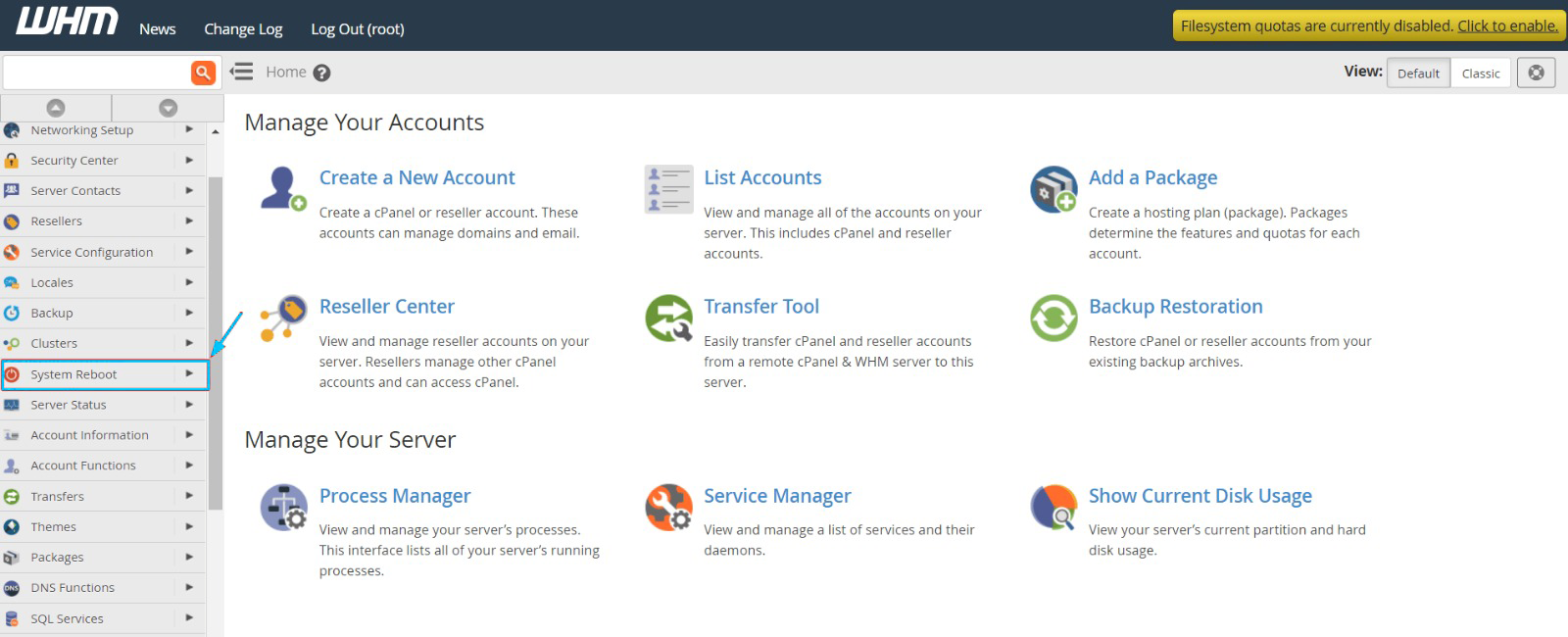
  1. You have to log in to your WHM panel’s root account.

  2. Find and select the System Reboot option from the navigation menu.

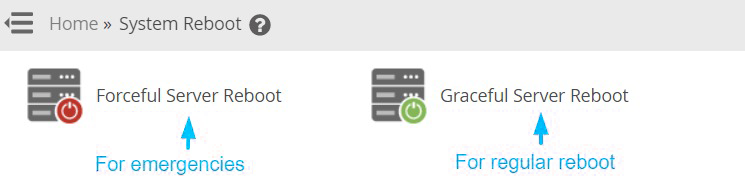
There are two choices that you can start with, Graceful Server Reboot and Forceful Server Reboot. In severe emergencies like a hacker attack, you should select the running applications. However, there is a risk of corruption of application files because of forceful termination.

Or, you can opt for choosing the Graceful Server Reboot as it will help running processes to end before closing. Although the process may take a long time, it’s the safer option of the two:

3. Select the two options as per the requirements:

4. Click on the Proceed button.

The post How to Reboot a VPS/Dedicated Server via WHM? first appeared on Web Hosting Stuff.

]]>
https://www.ashishkale.in/how-to-reboot-a-vps-dedicated-server-via-whm/feed/ 0
Top 26 List Of Cheap $1 Dollar Web Hosting Companies https://www.ashishkale.in/top-26-list-of-cheap-1-dollar-web-hosting-companies/ https://www.ashishkale.in/top-26-list-of-cheap-1-dollar-web-hosting-companies/#comments Sat, 03 Oct 2015 18:47:07 +0000 http://www.ashishkale.in/?p=885 When it comes to web hosting, you want to make sure that you are getting the best provider and the best value.  For those of you who are looking for cheap web hosting providers that start at $1 per hosting, here is a list of some of the best dollar web hosting providers shown below.  If you are also looking [...]

The post Top 26 List Of Cheap $1 Dollar Web Hosting Companies first appeared on Web Hosting Stuff.

]]>
When it comes to web hosting, you want to make sure that you are getting the best provider and the best value.  For those of you who are looking for cheap web hosting providers that start at $1 per hosting, here is a list of some of the best dollar web hosting providers shown below.  If you are also looking to create a blog network and want a way to get CHEAP ips, then you will also find that by hosting 1-2 websites per web host will allow you to do just this.

Host Ripples – https://hostripples.com/ Starting at $1 per month for linux and $2 per month for windows hosting. (also one of my favorite hosts – very friendly customer service)

HostDens – http://hostdens.com/ Starting at $1 per month for linux  (also one of my favorite hosts – very friendly customer service)

AI Cheap web Hosting – http://www.aicheapwebhosting.com/ $1 per month web hosting and up to 100gb bandwidth

Dollar SEO Hosting – http://www.dollarseohosting.com/ starts at $1 per month and $1 per c-class ip address

3ix – http://www.3ix.org/ One of my favorite cheap hosting providers starting $1 per month

123 Systems – http://123systems.net/Another favorite web hosting starting at $4 per year!

Hobo Host – https://www.hobohost.com/ Cheap $1 per month host with 3,000 mb space

My True Host – http://www.mytruehost.com/ Starts at $1 per month with unlimited bandwidth

Link Alone – http://www.linkalone.com/ Another $1 host with 1gb disk space

Hostica – http://www.hostica.com/ Starts at $1 for only 1 website

Host So – http://www.hostso.com/ $1 hosting with unlimited bandwidth and 20gb disk space

VPS Hosting Deal – http://www.vpshostingdeal.com/ Starts at $12 per year 1 core CPU and 20gb disk space

Host Bandit – http://hostbandit.com/ Starts at $1 a month with a cute little doggy mascot!

Zetta Host – http://www.zettahost.com/1-dollar-web-hosting $1 web hosting provider with unlimited disk space and bandwidth

Host Budget – http://www.hostbudget.com/1dollar-web-hosting.html Starts at $1 with 1 gb disk space

1 dollar Hosting – http://www.1dollar-webhosting.com/ Cheapest host yet starting at $.50 per month

Hosting Dude – http://www.hostingdude.com/ They still have their old 1970’s design! Starts at $1 per month hosting

Level Hosting – http://www.levelhosting.ca/hosting.html Offer plans from $35.70 a year or $2.98 a month (use coupon code “wht50life”)

Stable host – http://www.stablehost.com/ Offer plans starting at $3.95 per month (use coupon code “US-WHT2012-25” for 25% OFF For Life or “WHTLOVE” for 50% Off your first invoice)

Eleven 2 – http://www.eleven2.com/shared-hosting/ plans starting at $59.40 a year (use coupon code “wht40off” for 40% off)

Geek Storage – https://www.geekstorage.com/order/web-hosting.html plans starting at $7.99 a month (use coupon code “30OFF4LIFE” for 30% off for life)

Cirtex Hosting – http://www.cirtexhosting.com/ starting at $2.49 per month with unlimited storage and bandwidth (use coupon “forum” for 50% off)

Hawk Host – http://www.hawkhost.com/ Starting at $20 annually (coupon code “whts50v2” for 50% off your first payment)

Shark Space – http://www.eleven2.com/ Starting at $2.47 per month (use coupon “50offlife” for a 50% discount for life)

Always Web Hosting – http://www.alwayswebhosting.com/ starting at $6.95 (use coupon code “happynewyear” for 90% off)

Ninja Lion – http://www.ninjalion.com/shared.php plans starting at $29.50 per year (use coupon “launch” to get 50% off for life)

The post Top 26 List Of Cheap $1 Dollar Web Hosting Companies first appeared on Web Hosting Stuff.

]]>
https://www.ashishkale.in/top-26-list-of-cheap-1-dollar-web-hosting-companies/feed/ 2
How to Choose the Best VPS Hosting? https://www.ashishkale.in/how-to-choose-the-best-vps-hosting/ https://www.ashishkale.in/how-to-choose-the-best-vps-hosting/#respond Sat, 18 Jul 2015 10:42:29 +0000 http://www.ashishkale.in/?p=386 A virtual private server will be the right platform for people who are looking for hosting server which is reliable and stable to support their growing business. You can consider VPS hosting similar to dedicated server hosting but with few minor difference. Virtual private server ( VPS )is a single server that uses a single hard drive various hard drives [...]

The post How to Choose the Best VPS Hosting? first appeared on Web Hosting Stuff.

]]>
A virtual private server will be the right platform for people who are looking for hosting server which is reliable and stable to support their growing business. You can consider VPS hosting similar to dedicated server hosting but with few minor difference.

Virtual private server ( VPS )is a single server that uses a single hard drive various hard drives that has been divided for specific users. Every VPS user has different OSs allowing changes to be made without influencing other users file and data.


VPS_Hosting copy

1) Ram: RAM is most important factor when it comes to choosing VPS hosting. Even some people consider RAM as the only factor when it comes to determine the best VPS hosting. Because in VPS hosting your RAM will be used to run your operating system and as well as your server – it means that you’ll be using more RAM for your website as compared to shared hosting.

2) Managed or Unmanaged: VPS hosting comes with both managed and unmanaged tags. In shared hosting, you don’t get root access to the server and hence the question of managing the server does not arise.But when it comes to VPS hosting, the whole virtual server is handed over to you. So, there needs to be somebody to look after it and monitor its performance. If this is taken care of by your VPS provider, then it is called managed VPS, whereas in unmanaged VPS you need to take the responsibility of your server all by yourself.

3) Bandwidth: Bandwidth is always in our list when it comes to choose web hosting for our websites. Every web hosting service providers offer unlimited bandwidth, so it is very important to find out what unlimited really means.

4) Price: VPS hosting is considered to be a very affordable option, if you are looking for quality. When you are looking for long term success then you’ve to cut your pockets. Because quality always comes with higher price.

The post How to Choose the Best VPS Hosting? first appeared on Web Hosting Stuff.

]]>
https://www.ashishkale.in/how-to-choose-the-best-vps-hosting/feed/ 0