Deprecated: Optional parameter $shortcode declared before required parameter $args is implicitly treated as a required parameter in /home/ashishka/public_html/wp-content/plugins/wp-cirrus/wp-cirrus.php on line 331

Warning: Cannot modify header information - headers already sent by (output started at /home/ashishka/public_html/wp-content/plugins/wp-cirrus/wp-cirrus.php:331) in /home/ashishka/public_html/wp-content/plugins/all-in-one-seo-pack/app/Common/Meta/Robots.php on line 89

Warning: Cannot modify header information - headers already sent by (output started at /home/ashishka/public_html/wp-content/plugins/wp-cirrus/wp-cirrus.php:331) in /home/ashishka/public_html/wp-includes/feed-rss2.php on line 8
shared hosting | Web Hosting Stuff https://www.ashishkale.in Get solutions under one roof Fri, 09 Jan 2026 11:26:31 +0000 en-US hourly 1 5 Signs That Your Hosting Plan is No Longer Enough: Time for Dedicated Hosting https://www.ashishkale.in/5-signs-that-your-hosting-plan-is-no-longer-enough-time-for-dedicated-hosting/ https://www.ashishkale.in/5-signs-that-your-hosting-plan-is-no-longer-enough-time-for-dedicated-hosting/#respond Fri, 09 Jan 2026 11:26:31 +0000 https://www.ashishkale.in/?p=1782 As your website evolves, its hosting requirements inevitably change. What once worked well on shared or VPS hosting can become a bottleneck as traffic increases, applications grow more complex, and performance expectations rise. Slow load times, frequent downtime, limited customization, and security constraints are clear indicators that your current hosting plan may be holding your business back. Dedicated hosting is [...]

The post 5 Signs That Your Hosting Plan is No Longer Enough: Time for Dedicated Hosting first appeared on Web Hosting Stuff.

]]>

As your website evolves, its hosting requirements inevitably change. What once worked well on shared or VPS hosting can become a bottleneck as traffic increases, applications grow more complex, and performance expectations rise. Slow load times, frequent downtime, limited customization, and security constraints are clear indicators that your current hosting plan may be holding your business back.

Dedicated hosting is designed for websites and applications that demand high performance, advanced security, and complete server control. It provides exclusive access to server resources, ensuring stability, scalability, and reliability—critical factors for business-critical websites, e-commerce platforms, and high-traffic applications.

Below are five clear signs that indicate your existing hosting plan is no longer sufficient and that upgrading to dedicated hosting is the right strategic move for long-term growth and stability.

1. Consistent Slow Website Performance

Impact on User Experience: If your website is consistently slow or experiences downtime, it could be due to shared hosting limitations. Shared hosting resources (such as CPU, memory, and bandwidth) are distributed among multiple users, causing slowdowns during peak traffic times.

Dedicated Hosting Solution: Dedicated hosting ensures that you have exclusive access to server resources, boosting speed and performance.

2. Growing Website Traffic

Bandwidth Limits: As your site gains more visitors, shared hosting may no longer support the increased traffic. Shared servers can’t handle high traffic spikes efficiently, leading to slower load times or even crashes.

Dedicated Hosting Solution: A dedicated server can manage substantial traffic spikes and provide you with scalable resources, ensuring a seamless experience for users.

3. Need for Enhanced Security

Increased Vulnerabilities: Shared hosting environments are more vulnerable to security risks because you share a server with other websites. This increases the chances of being hacked or experiencing malware infections.

Dedicated Hosting Solution: With dedicated hosting, you get full control over the security of your server. You can implement custom firewalls, install security updates, and configure private security protocols to keep your website safe.

4. Custom Software or Application Requirements

Limited Flexibility: Shared hosting can restrict your ability to run custom software, applications, or control specific server configurations. This becomes an issue if your website requires specific technologies or custom setups.

Dedicated Hosting Solution: Dedicated hosting provides the flexibility to install any software, configure the server as needed, and have full control over your environment. You can run custom applications and software without restrictions.

5. Lack of Control and Flexibility

Restricted Access: On shared hosting, you are often limited to the control panel provided by the hosting provider, which may not allow for in-depth customization or advanced settings.

Dedicated Hosting Solution: Dedicated hosting gives you root access to the server, allowing you to fully control configurations, settings, and optimizations for maximum performance and customization.

Conclusion

If your website is growing in traffic, complexity, or security requirements, it’s time to upgrade to dedicated hosting. The increased control, security, and performance that come with dedicated servers are essential for businesses looking to scale effectively.

Switching to dedicated hosting not only enhances the experience for your website’s visitors but also provides peace of mind, offering the security and flexibility to grow your online presence.

Read: Can I Get Hosting Without Buying a Domain? Complete Guide

Frequently Asked Questions

1. What is dedicated hosting?

Dedicated hosting is a server environment where all hardware resources—CPU, RAM, storage, and bandwidth—are allocated exclusively to a single user or organization.

Unlike shared or VPS hosting, no resources are shared with other websites, ensuring consistent performance and higher reliability.

2. Who should use dedicated hosting?

  • Businesses with high-traffic websites or applications
  • E-commerce stores handling frequent transactions
  • SaaS platforms and enterprise applications
  • Websites with strict security and compliance requirements
  • Organizations needing full server customization and control

3. What distinguishes dedicated hosting from VPS hosting?

VPS hosting still shares physical server resources, even though they are virtually isolated.

Dedicated hosting provides complete ownership of the physical server, offering superior performance, stability, and customization.

4. Does dedicated hosting improve website speed?

Dedicated hosting significantly improves load times by eliminating resource contention.

Exclusive access to CPU, RAM, and storage ensures consistent performance, even during peak traffic periods.

5. Is dedicated hosting more secure than shared hosting?

Dedicated hosting reduces security risks since no other websites share the server.

You can implement custom firewalls, intrusion detection systems, and advanced security configurations tailored to your needs.

6. Do I need technical expertise to manage a dedicated server?

Basic server management knowledge is recommended for unmanaged dedicated hosting.

For businesses without in-house technical expertise, managed dedicated hosting provides professional server monitoring, updates, and support.

7. Can I customize the server environment on dedicated hosting?

Dedicated hosting offers full root or administrator access.

You can install custom software, configure operating systems, optimize performance settings, and manage security policies without limitations.

8. Is dedicated hosting scalable?

Dedicated servers support vertical scaling by upgrading hardware components such as RAM, CPU, and storage.

Many providers also offer hybrid or cloud-integrated solutions for future scalability.

9. Is dedicated hosting expensive?

Dedicated hosting costs more than shared or VPS hosting, but it delivers better performance, security, and reliability.

For growing businesses, the return on investment often outweighs the higher upfront cost.

10. When is the right time to upgrade to dedicated hosting?

  • When your website experiences frequent slowdowns or downtime
  • When traffic growth exceeds your current hosting capacity
  • When you need advanced security and compliance controls
  • When your applications require custom server configurations

Dedicated hosting is a long-term investment that supports business growth, performance excellence, and operational stability.

The post 5 Signs That Your Hosting Plan is No Longer Enough: Time for Dedicated Hosting first appeared on Web Hosting Stuff.

]]>
https://www.ashishkale.in/5-signs-that-your-hosting-plan-is-no-longer-enough-time-for-dedicated-hosting/feed/ 0
Navigating Cloud Hosting: Tips for Beginners https://www.ashishkale.in/navigating-cloud-hosting-tips-for-beginners/ https://www.ashishkale.in/navigating-cloud-hosting-tips-for-beginners/#respond Fri, 26 Sep 2025 10:59:45 +0000 https://www.ashishkale.in/?p=1669 Getting started with cloud hosting can feel overwhelming, especially if you’re new to web hosting or running your first online project. Unlike traditional hosting, where your website depends on a single server, cloud hosting uses a network of virtual servers. This means better speed, higher uptime, and the ability to scale your resources as your business grows. For beginners, the [...]

The post Navigating Cloud Hosting: Tips for Beginners first appeared on Web Hosting Stuff.

]]>
Getting started with cloud hosting can feel overwhelming, especially if you’re new to web hosting or running your first online project. Unlike traditional hosting, where your website depends on a single server, cloud hosting uses a network of virtual servers. This means better speed, higher uptime, and the ability to scale your resources as your business grows.

For beginners, the real challenge isn’t just choosing a provider—it’s knowing how to make the most of the features cloud hosting offers. From understanding pay-as-you-go pricing to configuring backups and security, each step plays a key role in your website’s success. By learning the basics and following simple best practices, you can avoid costly mistakes and unlock the full potential of the cloud.

☁ What is Cloud Hosting?

Cloud hosting is a type of web hosting that uses a network of interconnected servers (the cloud) to host websites and applications. Instead of relying on a single physical server, your site’s data and resources are spread across multiple servers.

⚡ This Setup Provides

  • 📈 Scalability: Easily upgrade or downgrade resources (CPU, RAM, storage) as your needs change.
  • ✅ Reliability: If one server fails, another automatically takes over, minimizing downtime.
  • 🚀 Performance: Load is balanced across multiple servers, improving speed and stability.
  • 💰 Pay-as-you-go pricing: You only pay for the resources you use.

In simple terms, cloud hosting is like renting a flexible, always-available network of servers rather than depending on one single machine. It’s a popular choice for businesses, eCommerce stores, and startups that want flexibility, security, and growth potential.

Read: Where Is My Email Storage Located?

⚖ Web Hosting vs Cloud Hosting

🌐 Web Hosting (Traditional Hosting)

In this type of web hosting, your website is hosted on a single physical server.

  • Common types: Shared Hosting, VPS (Virtual Private Server), and Dedicated Hosting.
  • Resources like CPU, RAM, and storage are limited to that one server.
  • If the server crashes, your website may face downtime.
  • Usually more affordable, but less flexible for sudden traffic growth.

☁ Cloud Hosting

Your website is hosted on a network of interconnected servers (the cloud).

  • Resources are drawn from multiple servers, so you can scale up or down easily.
  • It offers better uptime, load balancing, and faster performance.
  • If one server fails, others in the cloud automatically take over.
  • Usually costs more than shared hosting but gives flexibility and pay-as-you-go pricing.

📊 Simple Comparison

Web Hosting = One server, fixed resources, good for beginners with small sites.

Cloud Hosting = Many servers working together, scalable, ideal for growing businesses or websites with variable traffic.

⚖ VPS Hosting vs Cloud Hosting

🖥 VPS Hosting (Virtual Private Server)

  • A single physical server is divided into multiple virtual servers.
  • Each VPS has dedicated resources (CPU, RAM, storage), isolated from others on the same machine.
  • Performance is more reliable than shared hosting, but still limited by the physical server’s capacity.
  • Scaling requires upgrading to a bigger VPS plan (not instant).
  • Cost is usually lower than cloud hosting, making it a good step up from shared hosting.
  • Best for: Medium-sized websites, blogs, small businesses, or apps that need stable resources.

☁ Cloud Hosting

  • Uses a network of interconnected servers instead of just one machine.
  • Resources are drawn from multiple servers, so you can scale instantly (add more CPU, RAM, storage anytime).
  • More reliable—if one server fails, another takes over automatically.
  • Load is balanced across servers, improving speed and uptime.
  • Usually more expensive than VPS, but it offers flexibility and pay-as-you-go pricing.
  • Best for: Growing businesses, eCommerce, apps with unpredictable traffic, and mission-critical websites.

📊 Simple Comparison

VPS Hosting = One physical server, partitioned into virtual servers, stable but limited scalability.

Cloud Hosting = Many servers working together, flexible, highly scalable, and more reliable.

⚖ Dedicated Hosting vs Cloud Hosting

🖥 Dedicated Hosting

  • You rent an entire physical server that’s used only for your website or applications.
  • Full control over hardware, operating system, and software.
  • High performance since resources (CPU, RAM, storage) are not shared.
  • Scaling requires physically upgrading the server or migrating to a new one.
  • More expensive and requires strong technical management.
  • Best for: Large enterprises, websites with heavy, consistent traffic, and applications needing strict security/compliance.

☁ Cloud Hosting

  • Your website runs on a cluster of interconnected virtual servers (the cloud).
  • Resources can be scaled instantly without downtime.
  • More fault-tolerant—if one server fails, others handle the load.
  • Pricing is flexible (pay-as-you-go) based on usage.
  • Easier to manage, with many providers offering automated scaling, backups, and monitoring.
  • Best for: Startups, eCommerce, growing businesses, or apps with fluctuating traffic.

📊 Simple Comparison

Dedicated Hosting = One server, all yours, maximum control and power, but limited scalability.

Cloud Hosting = Many servers working together, flexible, scalable, and more resilient.

⚖ Shared Hosting vs Cloud Hosting

🖥 Shared Hosting

  • All kinds of websites use the same physical server and its resources (CPU, RAM, and storage).
  • Very affordable—ideal for beginners or small sites.
  • Limited performance—if one site on the server uses too many resources, others may slow down.
  • Scalability is minimal; usually requires upgrading to VPS or Cloud if traffic grows.
  • Ideal for: Hobby blogs, startup websites, personal portfolios, or sites with minimal visitor traffic.

☁ Cloud Hosting

  • Instead of relying on a single machine, your site runs across a distributed network of servers working together.
  • Resources are flexible—you can scale up or down instantly.
  • More reliable—if one server fails, another takes over.
  • Pricing is higher than shared hosting, but you pay for performance and uptime.
  • Best for: Growing businesses, eCommerce, and sites expecting traffic spikes.

📊 Quick Comparison

Shared Hosting = Cheapest, beginner-friendly, limited performance, not great for growth.

Cloud Hosting = Scalable, reliable, higher performance, pay-as-you-go flexibility.

Read: All About: Understanding the Importance of Secure Shell (SSH)

🔎 Conclusion

Cloud hosting may seem complex at first, but with the right approach, it becomes a powerful ally in building a reliable online presence. By starting small, learning how to scale, and making use of built-in tools like backups and security, beginners can quickly grow their confidence.

The real advantage of cloud hosting lies in its flexibility—allowing your website to adapt as your ideas, traffic, and business evolve. With a little guidance and smart planning, the cloud can turn from a technical hurdle into the foundation of your online success.

Frequently Asked Questions (FAQ)

1. What is cloud hosting in simple terms?

Cloud hosting is a type of web hosting where your website is powered by multiple servers instead of just one. This ensures better uptime, faster performance, and the ability to scale resources whenever you need them.

2. Is cloud hosting good for beginners?

Yes. Many providers offer easy-to-use dashboards and one-click installs, so even beginners can set up and manage websites without deep technical knowledge.

3. How is cloud hosting different from shared hosting?

Shared hosting runs multiple websites on a single server, while cloud hosting uses a network of servers. This makes cloud hosting more reliable, faster, and scalable—ideal for growing sites.

4. Do I need technical skills to manage cloud hosting?

Not necessarily. Most cloud hosting companies provide managed services, user-friendly control panels, and customer support. If you want full control, you can choose unmanaged plans, but they require more technical expertise.

5. Is cloud hosting expensive?

Cloud hosting is usually more costly than shared hosting but cheaper than dedicated hosting. The best part is its pay-as-you-go model, meaning you only pay for the resources you actually use.

6. What kind of websites should use cloud hosting?

Cloud hosting is ideal for eCommerce stores, blogs with growing traffic, business websites, mobile apps, and any project that needs flexibility and reliability.

7. Can I upgrade my hosting to cloud later?

Absolutely. If you’re currently on shared or VPS hosting, most providers make it easy to migrate your website to a cloud hosting environment.

The post Navigating Cloud Hosting: Tips for Beginners first appeared on Web Hosting Stuff.

]]> https://www.ashishkale.in/navigating-cloud-hosting-tips-for-beginners/feed/ 0 How to check Shared Web Hosting Server Usage? https://www.ashishkale.in/how-to-check-shared-web-hosting-server-usage/ https://www.ashishkale.in/how-to-check-shared-web-hosting-server-usage/#respond Fri, 08 Mar 2024 06:42:33 +0000 https://www.ashishkale.in/?p=1304 Shared hosting is the most used and demanding web hosting solution. It’s ideal for bloggers, startups, portfolios, small business users, etc. Shared hosting allows sharing of resources with other users on the server. Likewise, on shared hosting servers there are a finite amount of resources available for usage allocated to every user. This tutorial will help you to check your [...]

The post How to check Shared Web Hosting Server Usage? first appeared on Web Hosting Stuff.

]]>
Shared hosting is the most used and demanding web hosting solution. It’s ideal for bloggers, startups, portfolios, small business users, etc.

Shared hosting allows sharing of resources with other users on the server. Likewise, on shared hosting servers there are a finite amount of resources available for usage allocated to every user.

This tutorial will help you to check your shared web hosting server usage stats:

Steps to view your current usage in real-time:

To monitor your website’s current resource usage stats:

Note: displays may vary depending on individual usage on the server.

  1. You have to log in to your website’s cPanel.
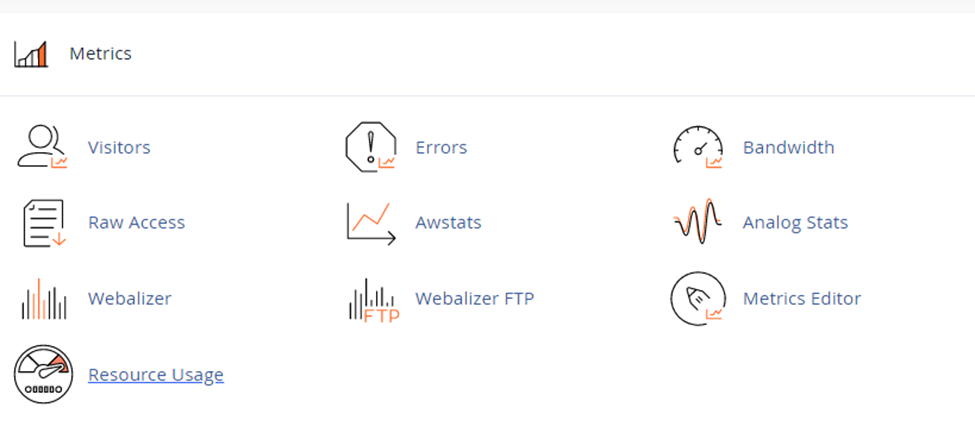
  2. After logging, you have to scroll down to the bottom section and wait on Metrics >> Resource Usage.

After clicking on “Resource Usage”. You will be redirected to resources usage page where you’ll monitor in and out of usage.

After landing on resources usage page, you can click on “Details”.           

After clicking on details button, you’ll get the resource usage detail >> where you’ve to click on time and period to get usage information.

Last, you’ll get the diagrams and tables showing detailed usage statistics.

Legend:

These terms are all related to monitoring resource usage on a system, likely a web server. Here’s a breakdown of each:

  • cpuf (CPU faults): This indicates the average CPU usage in terms of the percentage of faults. Faults are interruptions that cause the CPU to switch tasks. A higher cpuf value suggests the CPU is busy handling requests.
  • epf (entry processes faults): This refers to the average number of concurrent web server request faults. These faults occur when the server tries to handle new requests. A high epf might indicate the server is overloaded with incoming requests.
  • vmemf (virtual memory faults): This represents the maximum amount of memory allocated by process faults. Process faults happen when a program needs memory that isn’t readily available in physical RAM. A high vmemf could suggest the system is relying heavily on virtual memory, which can slow down performance.
  • NprocF (new processes faults): This indicates the number of faults related to creating new processes. A high NprocF might signify the frequent creation of new processes, which could put a strain on system resources.
  • Pmemf (physical memory faults): This refers to faults that occur due to processes allocating too much memory, causing the system to be unable to serve new client requests. High Pmemf suggests potential memory leaks or applications using excessive memory.
  • Iof (Input/Output faults): This indicates faults related to data write operations exceeding the usual time limit. High Iof could signify slow storage devices or overloaded I/O channels.
  • Iopsf (Input/Output operations per second faults): This refers to faults that occur when the amount of data written per second surpasses the usual limits. Similar to Iof, high Iopsf suggests potential bottlenecks in storage or I/O operations.

By monitoring these metrics, system administrators can identify potential performance issues and resource limitations. If you’re encountering any of these terms on your server control panel, it’s a good idea to investigate further to diagnose any underlying problems.

The post How to check Shared Web Hosting Server Usage? first appeared on Web Hosting Stuff.

]]>
https://www.ashishkale.in/how-to-check-shared-web-hosting-server-usage/feed/ 0