Deprecated: Optional parameter $shortcode declared before required parameter $args is implicitly treated as a required parameter in /home/ashishka/public_html/wp-content/plugins/wp-cirrus/wp-cirrus.php on line 331

Warning: Cannot modify header information - headers already sent by (output started at /home/ashishka/public_html/wp-content/plugins/wp-cirrus/wp-cirrus.php:331) in /home/ashishka/public_html/wp-content/plugins/all-in-one-seo-pack/app/Common/Meta/Robots.php on line 89

Warning: Cannot modify header information - headers already sent by (output started at /home/ashishka/public_html/wp-content/plugins/wp-cirrus/wp-cirrus.php:331) in /home/ashishka/public_html/wp-includes/feed-rss2.php on line 8
Mod security on Centos Web Panel | Web Hosting Stuff https://www.ashishkale.in Get solutions under one roof Mon, 04 May 2015 12:45:45 +0000 en-US hourly 1 How to Setup Mod Security on CentOs Web Panel https://www.ashishkale.in/how-to-setup-mod-security-on-centos-web-panel/ https://www.ashishkale.in/how-to-setup-mod-security-on-centos-web-panel/#respond Sun, 03 May 2015 11:31:21 +0000 http://www.ashishkale.in/?p=195 Grab a VPS with at least 512MB of RAM (Recommendation: Hostripples or Hostdens.) Install CWP by following my previous guide. Perform some basic configuration tasks. Setup Mod Security ModSecurity is an open source, cross-platform web application firewall (WAF) module. Known as the “Swiss Army Knife” of WAFs, it enables web application defenders to gain visibility into HTTP(S) traffic and provides [...]

The post How to Setup Mod Security on CentOs Web Panel first appeared on Web Hosting Stuff.

]]>

centos-web-panel

Setup Mod Security

ModSecurity is an open source, cross-platform web application firewall (WAF) module. Known as the “Swiss Army Knife” of WAFs, it enables web application defenders to gain visibility into HTTP(S) traffic and provides a power rules language and API to implement advanced protections.

list of the most important usage scenarios :

  • Real-time application security monitoring and access control
  • Virtual patching
  • Full HTTP traffic logging
  • Continuous passive security assessment
  • Web application hardening
  • Something small, yet very important to you

Find more details of Mod Security

Step 1 – Go to Security then Click on Mod Security menu:
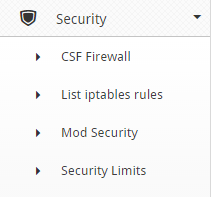
cwp10

Step 2 – By default this module is not installed. Click on Install Mod Security Tab .
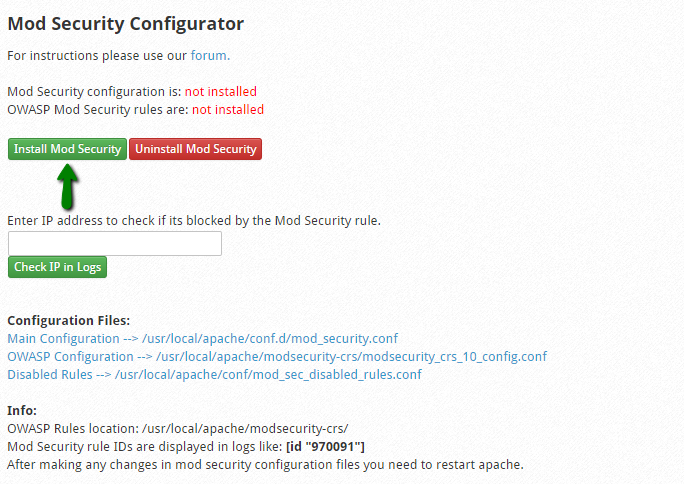
cwp11

Once you click on it you can see the below message :

cwp12

Once its install you can see the message :
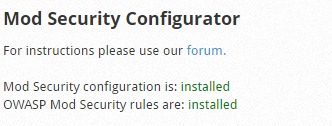
cwp13

That’s it. Mod_security includes some necessary rules  by default. But however if you want to go advance, you can manually edit each configuration file and adjust the rules as per your requirement.

The post How to Setup Mod Security on CentOs Web Panel first appeared on Web Hosting Stuff.

]]>
https://www.ashishkale.in/how-to-setup-mod-security-on-centos-web-panel/feed/ 0