Deprecated: Optional parameter $shortcode declared before required parameter $args is implicitly treated as a required parameter in /home/ashishka/public_html/wp-content/plugins/wp-cirrus/wp-cirrus.php on line 331

Warning: Cannot modify header information - headers already sent by (output started at /home/ashishka/public_html/wp-content/plugins/wp-cirrus/wp-cirrus.php:331) in /home/ashishka/public_html/wp-content/plugins/all-in-one-seo-pack/app/Common/Meta/Robots.php on line 89

Warning: Cannot modify header information - headers already sent by (output started at /home/ashishka/public_html/wp-content/plugins/wp-cirrus/wp-cirrus.php:331) in /home/ashishka/public_html/wp-includes/feed-rss2.php on line 8
Enable Apache SpamAssassin in Cpanel | Web Hosting Stuff https://www.ashishkale.in Get solutions under one roof Fri, 07 Aug 2015 13:07:51 +0000 en-US hourly 1 How to Enable Apache SpamAssassin in Cpanel https://www.ashishkale.in/how-to-enable-apache-spamassassin-in-cpanel/ https://www.ashishkale.in/how-to-enable-apache-spamassassin-in-cpanel/#respond Fri, 07 Aug 2015 13:05:22 +0000 http://www.ashishkale.in/?p=518 Spam Assassin                   Apache SpamAssassin is the Open Source anti-spam platform giving system administrators a filter to classify email and block spam (unsolicited bulk email). It uses a robust scoring framework and plug-ins to integrate a wide range of advanced heuristic and statistical analysis tests on email headers and body text including text analysis, [...]

The post How to Enable Apache SpamAssassin in Cpanel first appeared on Web Hosting Stuff.

]]>
Spam Assassin 

                 Apache SpamAssassin is the Open Source anti-spam platform giving system administrators a filter to classify email and block spam (unsolicited bulk email). It uses a robust scoring framework and plug-ins to integrate a wide range of advanced heuristic and statistical analysis tests on email headers and body text including text analysis, Bayesian filtering, DNS blocklists, and collaborative filtering databases.

To Enable Apache SpamAssassin in Cpanel

Following  steps to enable Apache SpamAssassin

1) Log into cPanel

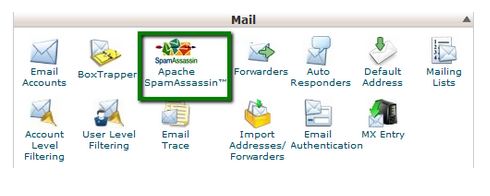
2) Navigate to Mail Section

3) Click on Apache SpamAssassin™ option

See Following Screenshot

apache spamassassin


4) Click on Enable Apache SpamAssassin™ button

See Following Screenshot

Enable Apache

.

.

.

Apache SpamAssassin is Enable!


The post How to Enable Apache SpamAssassin in Cpanel first appeared on Web Hosting Stuff.

]]>
https://www.ashishkale.in/how-to-enable-apache-spamassassin-in-cpanel/feed/ 0