Deprecated: Optional parameter $shortcode declared before required parameter $args is implicitly treated as a required parameter in /home/ashishka/public_html/wp-content/plugins/wp-cirrus/wp-cirrus.php on line 331

Warning: Cannot modify header information - headers already sent by (output started at /home/ashishka/public_html/wp-content/plugins/wp-cirrus/wp-cirrus.php:331) in /home/ashishka/public_html/wp-content/plugins/all-in-one-seo-pack/app/Common/Meta/Robots.php on line 89

Warning: Cannot modify header information - headers already sent by (output started at /home/ashishka/public_html/wp-content/plugins/wp-cirrus/wp-cirrus.php:331) in /home/ashishka/public_html/wp-includes/feed-rss2.php on line 8
Csf centos web panel | Web Hosting Stuff https://www.ashishkale.in Get solutions under one roof Mon, 04 May 2015 12:50:08 +0000 en-US hourly 1 How to Enable Config Server Firewall (CSF) on Centos Web Panel https://www.ashishkale.in/how-to-enable-config-server-firewall-csf-on-centos-web-panel/ https://www.ashishkale.in/how-to-enable-config-server-firewall-csf-on-centos-web-panel/#respond Sun, 03 May 2015 10:30:48 +0000 http://www.ashishkale.in/?p=190 Grab a VPS with at least 512MB of RAM (Recommendation: Hostripples or Hostdens.) Install CWP by following my previous guide. Perform some basic configuration tasks. Step 1 – Go to Security then Click on CSF Firewall                 Click on CSF Firewall and Scroll down . Then you can see an Option to Enable [...]

The post How to Enable Config Server Firewall (CSF) on Centos Web Panel first appeared on Web Hosting Stuff.

]]>

centos-web-panel

Step 1 – Go to Security then Click on CSF Firewall
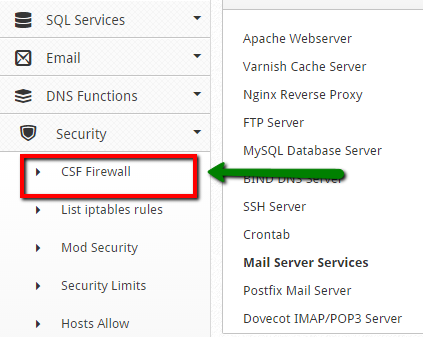
cwp7


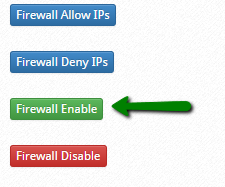
Click on CSF Firewall and Scroll down . Then you can see an Option to Enable firewall :
cwp8


Click on Firewall Enable .

Step 3 – Once activated, you can now edit few lines of CSF Configuration. Click on the Firewall Configuration button. And Add the SSH Port which we have changed in my  Previous Post  how to change SSH Port . You can see the New Port number added in CSF configuration file :
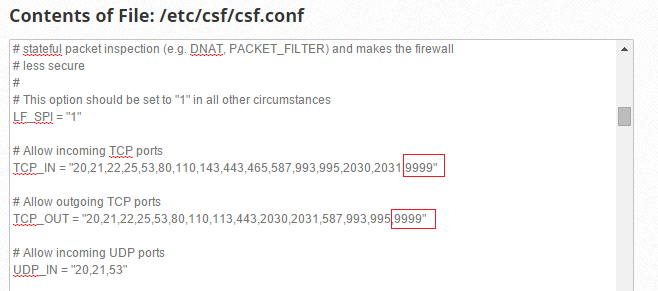
cwp9


Once done, click the Save Changes button.

The post How to Enable Config Server Firewall (CSF) on Centos Web Panel first appeared on Web Hosting Stuff.

]]>
https://www.ashishkale.in/how-to-enable-config-server-firewall-csf-on-centos-web-panel/feed/ 0