The post What is Shared Hosting? A Beginner’s Guide first appeared on Web Hosting Stuff.
]]>What is Shared Hosting?
SSD Shared hosting provider in USA is a web hosting service where multiple websites share the same server resources. This means your website will be hosted on the same physical server as other websites. Shared hosting is a popular option for small businesses and individuals because it is relatively inexpensive and easy to use.
Essential Tips for Shared Hosting Users
• Shared resources: Your website will share server resources with other websites on the same server. It has CPU, RAM, disk space, and bandwidth.
• Lower cost: Shared hosting is typically much less expensive than other types of web hosting, such as dedicated hosting or VPS hosting.
• Easy to use: Shared hosting is usually very easy to set up and use. Most shared hosting providers offer a control panel that makes it simple to manage your website.
• Limited control: Shared hosting gives you limited control over your server. You cannot customize your server configuration or install your software.
• Potential performance issues: If other websites on the same server are using a lot of resources, it can affect the performance of your website.
Read: What is DNS (Domain Name System) and How Does it Work?
Working of Shared Hosting
Server Purchase: A web hosting provider purchases a powerful server that is capable of handling multiple websites simultaneously.
Resource Allocation: The server’s resources (CPU, RAM, storage) are divided into smaller and virtualized portions. Each portion is assigned to a different website.
Website Hosting: Your website’s files are uploaded to the server’s allocated space.
Resource Sharing: When a visitor accesses your website, the server’s resources are shared among all active websites.
Advantages of Shared Hosting
Cost-effective
- Affordable: Shared hosting is generally the most budget-friendly option compared to other hosting types.
- No upfront costs: You often only pay a monthly or annual fee.
Easy to manage
- User-friendly control panels: Most of the hosting providers offer intuitive control panels like cPanel or Plesk, simplifying website management tasks.
- Technical support: Hosting providers typically offer customer support to assist with any technical issues.
Ideal for beginners
- Minimal technical knowledge required: Shared hosting is a good starting point for those who are new to website hosting.
- Simplified setup: The hosting provider handles most of the technical aspects.
Suitable for low to moderate traffic
- Efficient for smaller websites: Shared hosting can handle websites with moderate traffic levels.
Scalability
- Upgrade options: As your website grows, you can often upgrade to a more powerful shared hosting plan or other hosting types.
Remember: While shared hosting offers many advantages, it’s important to consider its limitations, such as shared resources and potential security risks. If your website requires high performance or more control over server resources, other hosting options like VPS or dedicated hosting might be better suited.
Read: Navigating the eCommerce Landscape: A Starter’s Guide
List of alternatives to Shared Hosting
Virtual Private Server (VPS) Hosting
- More control: VPS gives you more control over your server resources than shared hosting.
- Dedicated resources: You have a dedicated portion of a server, ensuring better performance.
- Scalability: VPS can be easily scaled up or down as your needs change.
- Higher cost: VPS is generally more expensive than shared hosting.
Dedicated Server Hosting
- Complete control: Dedicated servers provide full control over your server environment.
- Optimal performance: You have exclusive access to the entire server’s resources.
- High cost: Dedicated servers are the most expensive hosting option.
- Technical expertise: Managing a dedicated server requires more technical knowledge.
Cloud Hosting
- Flexibility: Cloud hosting allows you to scale resources on-demand based on your website’s needs.
- Reliability: Cloud providers offer high levels of redundancy and fault tolerance.
- Cost-effective: Cloud hosting can be cost-effective, especially for fluctuating workloads.
- Technical complexity: Managing cloud infrastructure can be complex for those without experience.
Managed Hosting
- Outsourcing management: Managed hosting providers handle server management tasks on your behalf.
- Expertise: You can avail the benefit of the expertise of the hosting provider’s technical team.
- Higher cost: Managed hosting typically comes with additional fees for management services.
Choosing the right alternative depends on your website’s specific requirements, budget, and technical expertise.
The post What is Shared Hosting? A Beginner’s Guide first appeared on Web Hosting Stuff.
]]>The post How to check Shared Web Hosting Server Usage? first appeared on Web Hosting Stuff.
]]>Shared hosting allows sharing of resources with other users on the server. Likewise, on shared hosting servers there are a finite amount of resources available for usage allocated to every user.
This tutorial will help you to check your shared web hosting server usage stats:
Steps to view your current usage in real-time:
To monitor your website’s current resource usage stats:
Note: displays may vary depending on individual usage on the server.
- You have to log in to your website’s cPanel.
- After logging, you have to scroll down to the bottom section and wait on Metrics >> Resource Usage.
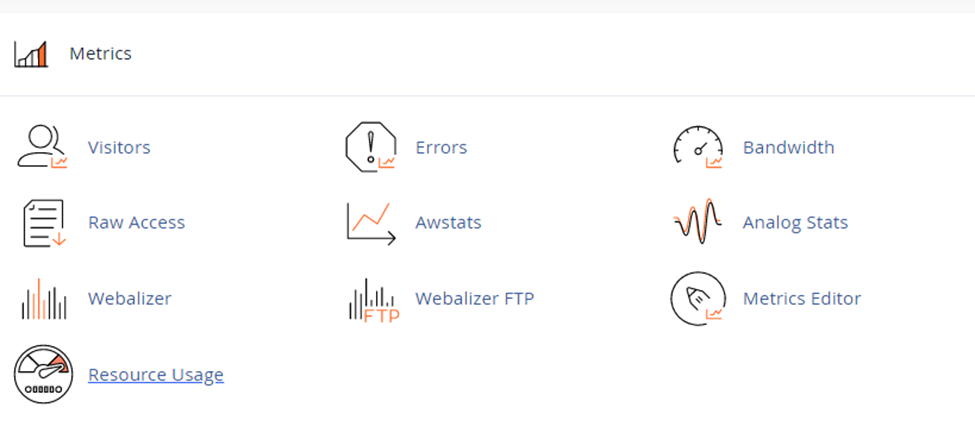
After clicking on “Resource Usage”. You will be redirected to resources usage page where you’ll monitor in and out of usage.

After landing on resources usage page, you can click on “Details”.

After clicking on details button, you’ll get the resource usage detail >> where you’ve to click on time and period to get usage information.

Last, you’ll get the diagrams and tables showing detailed usage statistics.

Legend:
These terms are all related to monitoring resource usage on a system, likely a web server. Here’s a breakdown of each:
- cpuf (CPU faults): This indicates the average CPU usage in terms of the percentage of faults. Faults are interruptions that cause the CPU to switch tasks. A higher cpuf value suggests the CPU is busy handling requests.
- epf (entry processes faults): This refers to the average number of concurrent web server request faults. These faults occur when the server tries to handle new requests. A high epf might indicate the server is overloaded with incoming requests.
- vmemf (virtual memory faults): This represents the maximum amount of memory allocated by process faults. Process faults happen when a program needs memory that isn’t readily available in physical RAM. A high vmemf could suggest the system is relying heavily on virtual memory, which can slow down performance.
- NprocF (new processes faults): This indicates the number of faults related to creating new processes. A high NprocF might signify the frequent creation of new processes, which could put a strain on system resources.
- Pmemf (physical memory faults): This refers to faults that occur due to processes allocating too much memory, causing the system to be unable to serve new client requests. High Pmemf suggests potential memory leaks or applications using excessive memory.
- Iof (Input/Output faults): This indicates faults related to data write operations exceeding the usual time limit. High Iof could signify slow storage devices or overloaded I/O channels.
- Iopsf (Input/Output operations per second faults): This refers to faults that occur when the amount of data written per second surpasses the usual limits. Similar to Iof, high Iopsf suggests potential bottlenecks in storage or I/O operations.
By monitoring these metrics, system administrators can identify potential performance issues and resource limitations. If you’re encountering any of these terms on your server control panel, it’s a good idea to investigate further to diagnose any underlying problems.
The post How to check Shared Web Hosting Server Usage? first appeared on Web Hosting Stuff.
]]>